Designing Tiempo: Weather Through the Lens of Elevation

A weather forecast usually starts with a place name. That is a useful way to find a location, but it leaves out a dimension that matters when the landscape rises around you: elevation. The question becomes more specific when a day involves moving uphill. What does the weather mean for the places I actually plan to spend time?
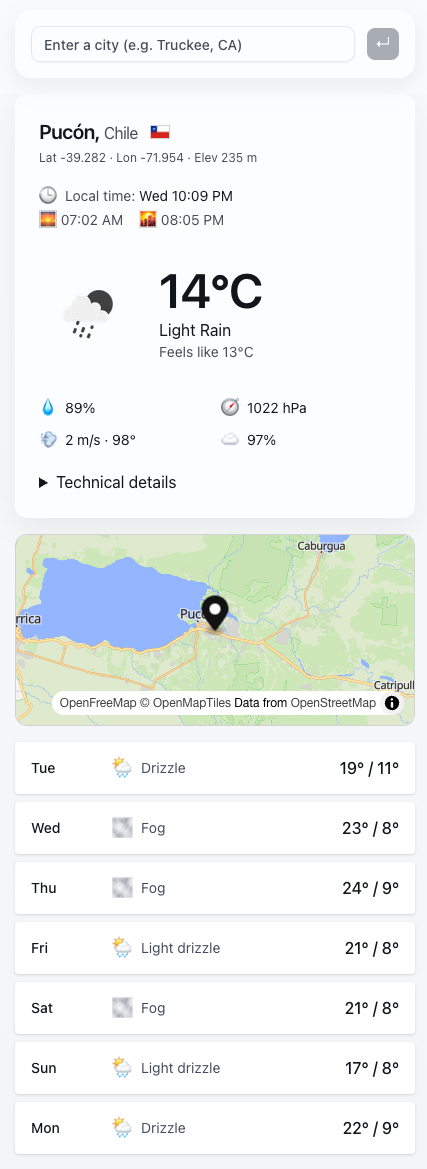
Tiempo explores that question through a focused premise: check local weather conditions by elevation. It brings together two interests that also shape my mapping work: understanding a place through data and making that data easier to interpret in context.
A place has a vertical dimension
Searching by city gives a weather app a convenient starting point. For someone thinking about nearby hills or mountains, the city is also a reference point within a larger landscape. A forecast becomes more useful when the interface helps the reader understand which location and elevation it describes.
That changes the design question. Alongside presenting a temperature or condition, the interface needs to establish context. Where does this information apply? How should someone relate it to the terrain they are considering? Elevation deserves a place in that hierarchy because it changes how the reader frames the rest of the information.
Give the data a clear frame
Weather interfaces can become crowded quickly. Each additional number competes for attention, even when it answers a different question. A useful starting point is to establish the place, time, and units before asking the reader to compare conditions. Those details provide the frame that makes a measurement meaningful.
I see Tiempo as an opportunity to explore that relationship between context and detail. The aim is an experience someone can return to with a specific question about local conditions. The design challenge is deciding which information helps answer that question and how much explanation it needs beside it.
Keep the source visible
Tiempo credits OpenWeather as its weather data provider. That attribution belongs to the experience: the interface presents information supplied by another system, and readers should be able to identify that source.
Elevation also raises a question about precision. Showing a specific altitude can make a result feel highly local. A responsible design needs to explain the relationship between that altitude and the weather data being displayed. A coordinate, an elevation, and a forecast each describe a different part of the picture; their relationship needs to be legible.
Connect weather with a sense of place
Tiempo sits alongside my work on AndesMap, which explores mountain terrain and the information people use to understand it. The two projects approach place from complementary directions. A map helps establish the landscape. Weather adds a changing layer of context to the questions we ask about it.
What interests me about Tiempo is how a small change in framing can reshape a familiar product. Starting with elevation invites a more situated reading of the weather. It is a focused way to explore a broader product design question: which piece of context makes the information in front of someone more useful?